
To access funding for your apprentice and ensure their training is covered, it is essential to set up an account on the Digital Apprenticeship Service (DAS). This platform allows employers to manage apprenticeship funding and training efficiently. By creating an account, you can easily allocate funds, track payments, and ensure compliance with government requirements. The DAS provides a streamlined process to support your apprentices' development, ensuring they receive the necessary training to excel in their roles. Setting up your account is a crucial step in fostering a skilled and capable workforce.
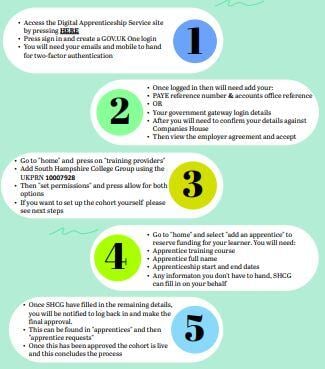
You can find the full government guidance on what you need ready to set up your account here. When you're ready, you can click here to create your account, just follow this simple flowchart to help you.
If you need more detailed advice, use this video to help you with how to set up your account on the Apprenticeship Service
If you have an account, but need to add your Apprentice, you can follow this simple walk through to show you how