
You should become familiar with the process diagram, which you can find here:
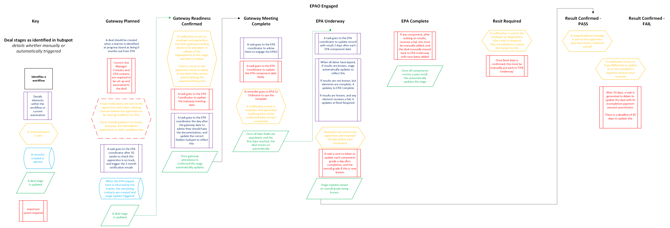
You can also access a step by step guide for deals in the End Point Assessment Pipeline here.
Some of you, however, like to see things written out, so the article below outlines the full process with a little more explanation. It explores:
- Each deal stage in the “End Point Assessment Pipeline”
- What is done manually and what happens automatically
- Who needs to do what and when
- How HubSpot workflows, notifications and records support you
The tone of this process is supportive. Automation is here to help you stay organised and keep transfers on track, not to catch anyone out.
1. Process overview
The EPA transfer process is managed through a dedicated transfer pipeline in HubSpot. Each transfer is represented by a deal, which moves through the following stages:
- Request Received
- In Progress with SHCG
- Paperwork out for signature
- Final Check – Compliance
- CLOSED – Complete
- ON HOLD (manual “parking bay” stage, used only when a deal stalls)
At each stage, HubSpot:
- Sends notifications and tasks to the right people
- Creates or updates records and associations
- Sends emails and forms to employers
- Includes delays and reminders to help keep the transfer on track
Insert your process diagram here.
3. Key to the process and workflows
On the diagram and in this guide you will see:
- Deal stages as identified in HubSpot – the main steps in the transfer process
- Workflows and automation – what the system does for you
- Communications sent – emails or notifications sent automatically
- Records created or altered – new or updated records for apprentices, employers and associations
- Important actions required – where you need to step in manually
If you are unsure at any point, check the deal record’s activity timeline, associations and tasks to see what has already happened.
2. Stage-by-stage explanation
Request Received
How a transfer starts
- The Employer Transfer Form is completed by the trainer.
- A deal is automatically created in HubSpot in the transfer pipeline.
Automatic notifications
- A notification goes to the allocated Business Partner (BP) to alert them of a new transfer.
- A notification goes to Compliance to update the programme (pro) and the deal record.
- A notification goes to Kate Chester to contact the trainer for an updated delivery plan.
- A notification goes to Jemma to update the deal owner in HubSpot according to information populated by Compliance.
- A notification goes to Jo to update the Compliance team member supporting the transfer in HubSpot.
Automatic communications and records
- Tasks are sent to Eileen to action the Digital Apprenticeship Service (DAS) for both the new and old employer.
- Emails go to the new employer and the original employer, confirming details we hold and advising that the transfer is in process.
- The new employer email includes a form to update details (including ELI).
- Health and safety information still needs to be sent manually until this is built into HubSpot and embedded.
Record creation and associations
Where records do not already exist:
- A record is created for the apprentice and associated with the transfer.
- A record is created for the new employer and associated with the transfer.
- An association is created for the old employer, linking them to the transfer.
Important: If any of the apprentice or employer contacts already existed in HubSpot before the transfer, the system cannot re-create them.
You must manually associate them to the deal at this stage.
You only have 1 day to make these manual associations. If the deal moves on without all three contacts associated, automated messages may fail.
Automatic movement to the next stage
- The deal is automatically moved to the next stage when:
- It has three associated contacts, or
- 2 days have passed since deal creation.
In Progress with SHCG
This stage covers the internal work needed to prepare everything for the transfer.
Timed checks and delays
- There is a delay of 1 week to allow the BP and Compliance team member to complete their tasks.
Business Partner responsibilities
- The BP should:
- Update employer documentation and requirements for the new employer, if not already in place.
- Check the transfer, especially that all three contacts (apprentice, new employer, old employer) are correct and associated.
Compliance responsibilities
- The Compliance team member should:
- Ensure a delivery plan is in place.
- Ensure e-sign-up is ready to go out.
Additional delay and reminder
- After the first week, the system allows an additional 5 days for:
- The BP and Compliance team member to complete their actions, and
- The deal stage to be updated.
- If the stage is still not updated, an automatic reminder goes to the Compliance team member to ensure the transfer remains on track.
Paperwork out for signature
This stage begins when documentation is sent out for signatures.
Manual action to enter this stage
- The stage must be manually changed by Compliance when the paperwork is sent out.
Automatic checks
- The system completes three checks (on day 1, day 2 and day 4) to ensure all signature fields on the Apprenticeship Agreement are complete.
Escalation if signatures are missing
- If signatures are still incomplete after these checks, the system:
- Raises a support request to Jo P, notifying that the transfer is at risk of running past the deadline.
What Compliance must do
- The Compliance team member must update the ‘Apprenticeship Agreement Signed’ fields in the deal.
- This update is required to move the transfer forward and to stop reminders.
Final Check – Compliance
This stage focuses on final quality checks and confirmation.
Automatic task
- A task is sent to Jo P to notify her that a transfer is ready for final checks.
- Jo can either complete this task herself or re-assign it to another Compliance team member.
Manual checks
- Jo (or the allocated Compliance colleague) must:
- Check the full details of the transfer.
- Liaise with MIS to ensure data is correct and up to date.
Delay
- There is a 3-day delay built in at this stage, to allow time for these checks to be completed.
CLOSED – Complete
This stage confirms the transfer is fully completed.
What Compliance must do
- The allocated Compliance team member must:
- Confirm the apprentice is “enrolled to new employer” in HubSpot.
- Then close the deal.
Tasks to Eileen
- Eileen receives a task to:
- Confirm the DAS is live with the new employer.
- Update the deal, if this has not already been done.
Manual close
- A Compliance team member must manually close the deal once everything is confirmed.
ON HOLD
This is a manual stage used when a deal stalls.
When to use ON HOLD
- Examples:
- You are waiting for key information from an employer or trainer.
- There is a blocker that prevents the transfer from progressing.
What you must do
- If you move a deal to ON HOLD:
- Add clear notes explaining why it has been paused.
- Update notes frequently with:
- Any follow-up actions taken
- Responses received
- Next planned steps or review dates
Using ON HOLD properly helps everyone understand the current position and reduces the risk of transfers being forgotten.
5. Your responsibilities vs. automation
To summarise:
HubSpot automation will:
- Create the transfer deal when the Employer Transfer Form is submitted.
- Send notifications to BPs, Compliance, Jemma, Jo, Kate and Eileen as needed.
- Create or associate apprentice and employer records (where they do not already exist).
- Send emails to the new and original employers.
- Apply delays, reminders and checks to keep the transfer moving.
- Escalate risk to Jo P when signatures may miss deadlines.
- Automatically move the deal from Request Received to the next stage in certain conditions.
You (team members) need to:
- Manually associate existing contacts to the deal (within 1 day) where they were already in HubSpot.
- Complete your assigned tasks within the time frames.
- Update deal stages when required (for example, when paperwork is sent out, or when enrolment is complete).
- Keep notes and fields up to date, especially when using ON HOLD.
- Check that all three key contacts are correctly associated to the transfer.
6. Support and troubleshooting
If something does not look right, or if automated messages have not been sent as expected, please check:
- Associations – Are the apprentice, new employer and old employer all correctly linked to the deal?
- Deal stage – Is the deal in the correct stage for the automation you expect?
- Key fields – Have all required fields (for example, Apprenticeship Agreement Signed) been updated?
If you are still unsure, speak with your line manager, your Compliance lead, or the HubSpot admin for support.