
You can familiarise yourself with the process visually by utilisng the process map which is shown below.
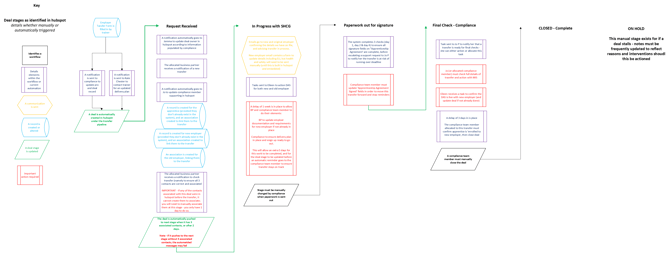
You can also make use of this step by step guide that walks you through the creation and management of Employer Transfers within our own system.
For those of you who like a written guide though, this is outlined below, and you can also find a video walk through here
Quick-reference guide – Employer Transfer Process (Transfers Pipeline)
Use this as a high-level “at a glance” summary.
Stages and purpose
- Request Received – a transfer has been requested and captured in the Transfers Pipeline.
- In Progress with SHCG – SHCG teams are actively working on the transfer details and setup.
- Paperwork out for signature – formal documents have been issued for signature.
- Final Checks – Compliance – final quality, funding and DAS checks are completed.
- Closed – Complete – the transfer is fully implemented and confirmed.
- On Hold – the transfer is paused due to a blocker (e.g. missing information or employer decision).
Key actions and automation by stage
1. Request Received
- Automation typically does:
- Logs the deal in the Transfers Pipeline.
- May trigger notifications/tasks to relevant staff.
- You must:
- Check and associate apprentice, original employer, new employer.
- Confirm key dates and early funding / transfer info.
- Add notes if there are any known risks or queries.
2. In Progress with SHCG
- Automation typically does:
- Creates tasks and reminders for BPs, Compliance and DAS support.
- Tracks how long the deal remains in this stage.
- You must:
- Confirm DAS setup (transfer) and DAS Cohort Status (Transfer).
- Ensure dates and apprenticeship details are accurate.
- Move to Paperwork out for signature when ready to send documents.
3. Paperwork out for signature
- Automation typically does:
- Sends e-sign or email links for Apprenticeship Agreement and Employer Agreement.
- Triggers reminders/escalations if paperwork is not returned in time.
- You must:
- Track Apprenticeship Agreement Signed and Employer Agreement statuses.
- Chase outstanding signatures and update notes.
- Move to Final Checks – Compliance when all required paperwork is back.
4. Final Checks – Compliance
- Automation typically does:
- Assigns or reminds Compliance to complete final checks.
- Monitors how long deals stay in this stage.
- You must:
- Confirm:
- All agreements are signed and recorded.
- Funding and DAS details are correct.
- Associations (apprentice, original employer, new employer) are complete.
- Move to Closed – Complete when satisfied.
- Confirm:
5. Closed – Complete
- Automation typically does:
- Can log final status and, where configured, trigger confirmation emails/tasks.
- You must:
- Confirm DAS and internal systems reflect the final transfer.
- Add a short closing note summarising the outcome.
6. On Hold
- Automation typically does:
- Tracks how long the transfer has been paused.
- Can trigger reminder or escalation tasks after set thresholds.
- You must:
- Use On Hold only when there is a genuine blocker.
- Record why it is on hold and what you are waiting for.
- Move the deal back to the relevant active stage once the issue is resolved.